
Damon theme (furniture and home store)
Damon theme (furniture and home store)
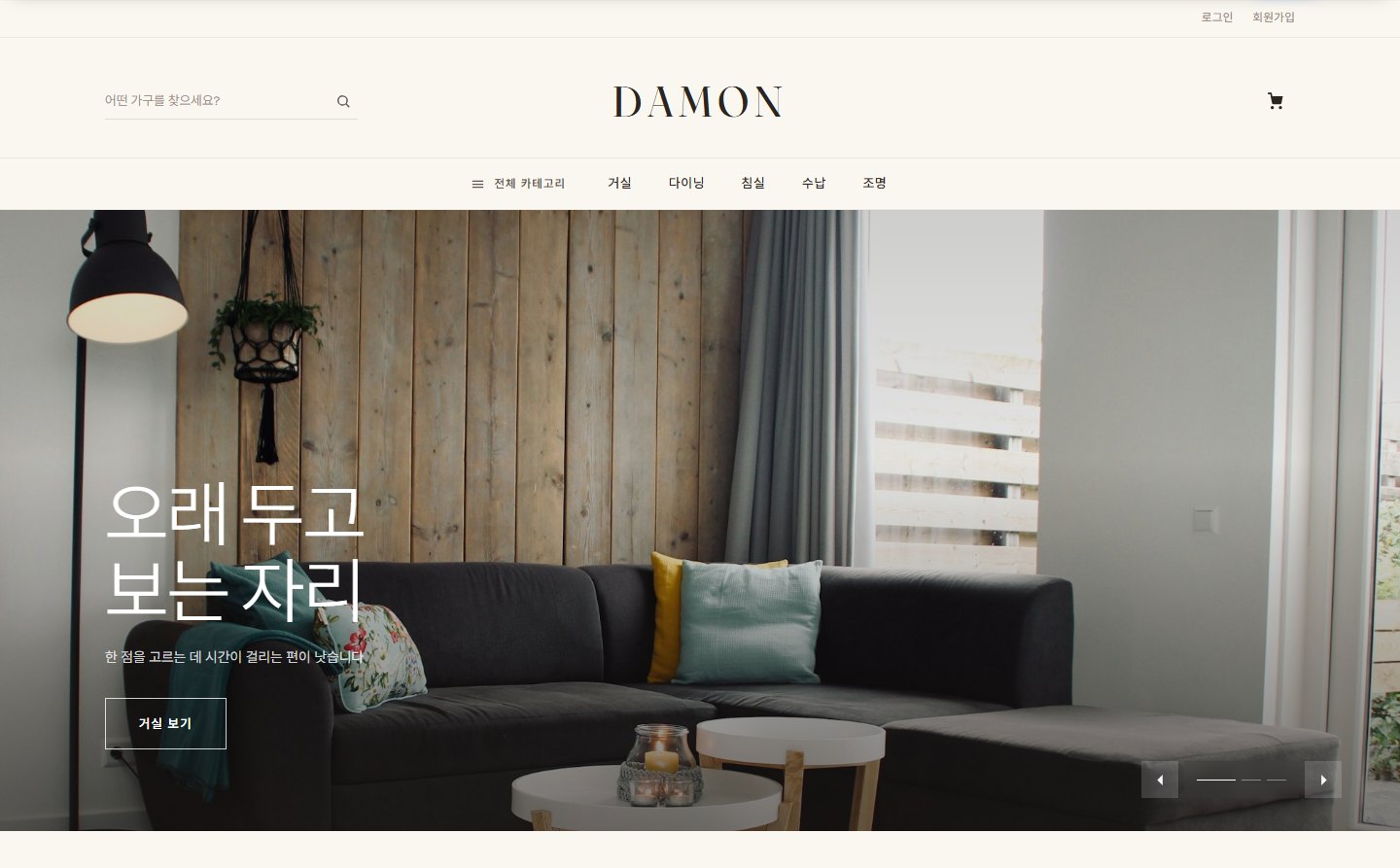
This is the manual for Damon (damon), the official Zittme theme for furniture and home stores. The palette is kept to a single walnut brown on an oatmeal background, and serif headings, generous white space, and a low-density three-column grid invite shoppers to linger over each product. It uses the same framework as the Sinsunhan theme (built-in theme main page, sections assembled with repeat fields), so for anything not covered here, see the Sinsunhan theme (online store) document as well.
Demo: damon-demo.zitt.me
Components
| Component | Location | Role |
|---|---|---|
| Layout | themes/damon/layouts/damon | Site frame + built-in theme main page |
| Commerce skin | themes/damon/modules/commerce | Store home · list · detail · cart · order · my shopping · promotions · seller store |
| Board skin | themes/damon/modules/board | List-style · card-style boards |
| Member · message · notification center · system message skins | themes/damon/modules/{member, communication, ncenterlite, message} | Login · my page · messages · notifications · system notices |
| Reservation · zittme Pay · contact · knowledge Q&A skins | themes/damon/modules/{reservation, zittme_pay, contact, kin} | Applied only on sites where the module is installed |
Installing and applying
- Install it from the store, or unzip it into
themes/damon. - In Admin > Design settings, choose Damon and apply it.
- If the Commerce module is installed, the store menu, header search, and main page product sections connect automatically. If you have several store modules, enter the mid in Layout settings > Main page > "Store module address (mid)".
- Set the page type by entering
m(main) /sl(sub) /sf(full width) as the menu class in the sitemap. Member, message, and payment screens are automatically full width. - The wordmark sits in the center, with product search on the left and cart and notification icons on the right. If you leave the logo image empty, the logo text appears as a serif wordmark.
- On mobile, a bottom tab bar (Home · Categories · Search · Cart · My page) is added.
- Color mode can be Auto (follows device settings), Light, or Dark. In Auto, the browser remembers the choice a visitor makes.
- List: categories · search · sorting. Cards show the seller (store) name · discount rate · original price.
- Detail: product name · price · points · shipping fee · options · Buy now · Cart, shipping · dimensions · exchange information, Reviews · Questions tabs, seller information.
- Seller store: when the open market is turned on, each store shows a header image · in-store search · featured · new arrivals · all products.
- Promotions · cart · order · my shopping: the same flow as the Sinsunhan theme, and payment continues in the zittme Pay skin.
Recommended: Zittme 1.0.1 or later, Commerce 1.1.1 or later. This is a responsive theme, so we recommend turning off the mobile-only view.
Header and color mode
Built-in theme main page (main page)
Assemble it in order with the "Main page sections" repeat field on the Main page tab of Layout settings. If there are no sections, the default set is used (category tiles → new arrivals → banner → recommended → brands → promotions → ranking → banner → on sale → daily deal → latest board posts).
| Section type | Content | Source (source) | Count (count) |
|---|---|---|---|
| Store category tiles | Shortcuts to top-level categories. Icons come from the "Category icons" repeat field | - | Number of tiles |
| Recommended / New / On sale / Popular products | Three-column product card grid | - | Number of products |
| Daily deal | One discounted product that changes every day | - | - |
| Active promotion cards | Commerce promotions as image cards | - | Number of cards |
| Popular ranking | Ranked list 1–N with category tabs | - | Number of ranks |
| Brand row | Logos · names · links registered in the "Brands" repeat field | - | Number of brands |
| Banner strip | Reuses a hero slide image as a mid-page banner | Slide number (leave empty to go in order) | - |
| Latest board posts | Board post list. Enter several mids separated by commas for multiple columns | Board mid (e.g. notice,board) | Number of posts |
If you leave a section title empty, the default title for that type is shown.
Store screens (Commerce skin)
Footer
In Layout settings > Footer, fill in the site introduction, customer service phone · hours · email, social media links, bottom notice text, business and contact information, and copyright notice. Connect the footer menu to "Footer menu" in the sitemap.
All layout settings
Basic
Logo image · dark mode logo · logo text · accent color · maximum content width (1060 · 1180 · 1320) · menu bar width · menu bar color · mobile dark mode button position · mobile language selector position · color mode
First screen
Show hero slider · auto-advance interval · hero slides (background image · title · description · button label · button link · text alignment)
Main page
Category icons · brands · store module address (mid) · main page sections (type · title · source · count)
Content · sidebar
Use unified search · show login box in sidebar
Footer
Site introduction · customer service phone number · hours · contact email · 4 social media links · bottom notice text · business and contact information · copyright notice